Kafka / Practical example
Designing a ride-sharing service
We will start with the application, understand its services, and then introduce Kafka where it helps.
1. Requirements
A passenger should be able to request a ride, receive a driver, see the driver’s location, complete the trip, pay, and receive a receipt.
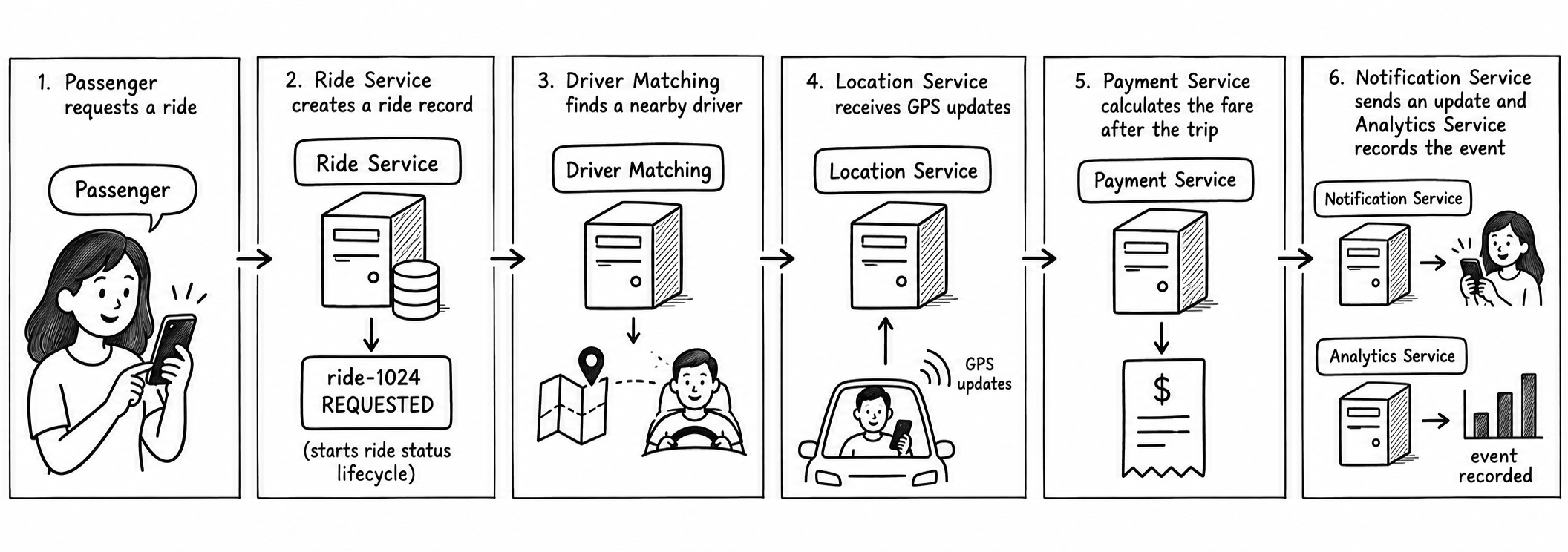
2. Services
Separate services own separate responsibilities:
- Ride Service: creates rides and tracks their state.
- Driver Matching: finds an available nearby driver.
- Location Service: receives driver GPS updates.
- Payment Service: charges the passenger and handles refunds.
- Notification Service: sends app, email, or SMS messages.
- Analytics Service: builds business reports.
Each service can be scaled and deployed independently.
3. Why direct calls become difficult
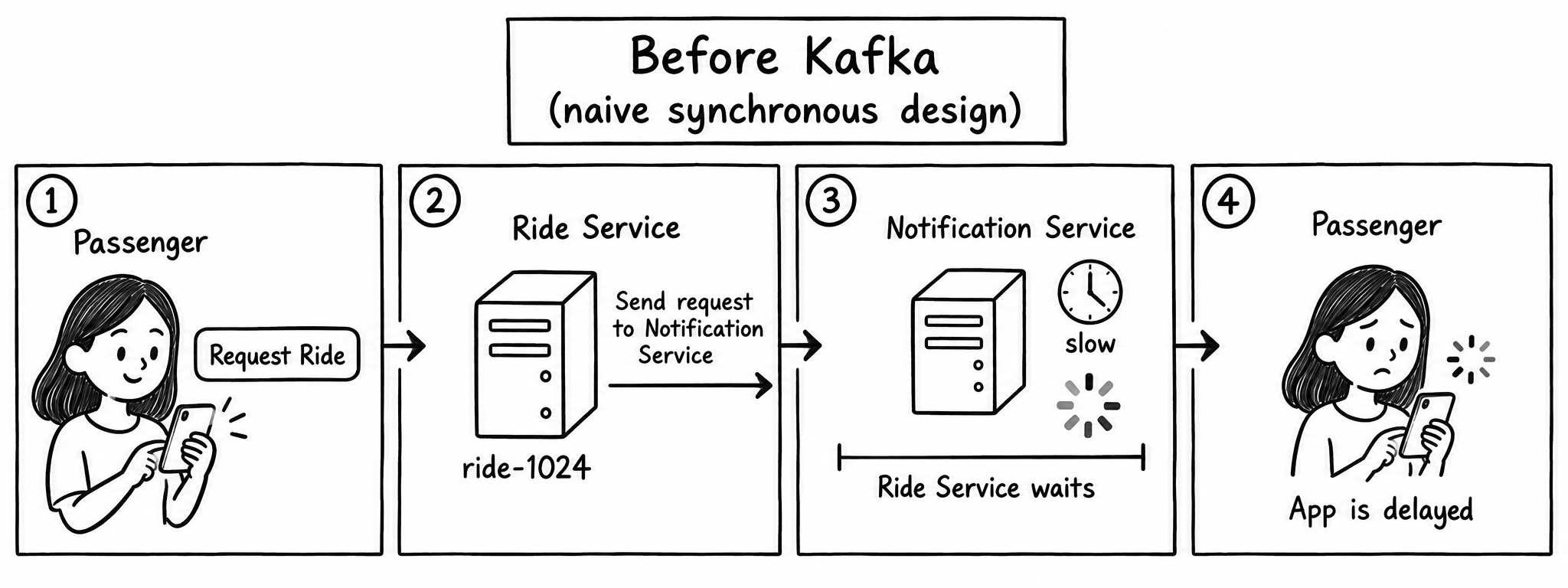
Some calls need an immediate answer. After creating ride-1024, the Ride Service may call Driver Matching and wait for a result because the passenger needs to know whether a driver was found.
Passenger → Ride Service ──direct call──> Driver Matching
                         ← driver result ──
Other services only need to react after the ride has been created. If the Ride Service calls each of them directly, it becomes responsible for their addresses, timeouts, retries, and failures:
Ride Service ──direct call──> Notification
             ──direct call──> Analytics
             ──direct call──> Payment
Now a slow Notification or Analytics service can delay the Ride Service. A temporary outage can force it to retry or return an error, even though the ride record was already created successfully. Every new service also adds another connection to maintain.
4. How Kafka solves the issue
The Ride Service saves the ride and publishes one RideRequested event. Kafka stores that event and delivers it independently to every interested service. The Ride Service can acknowledge the passenger without waiting for Notification, Analytics, or other background services to finish.
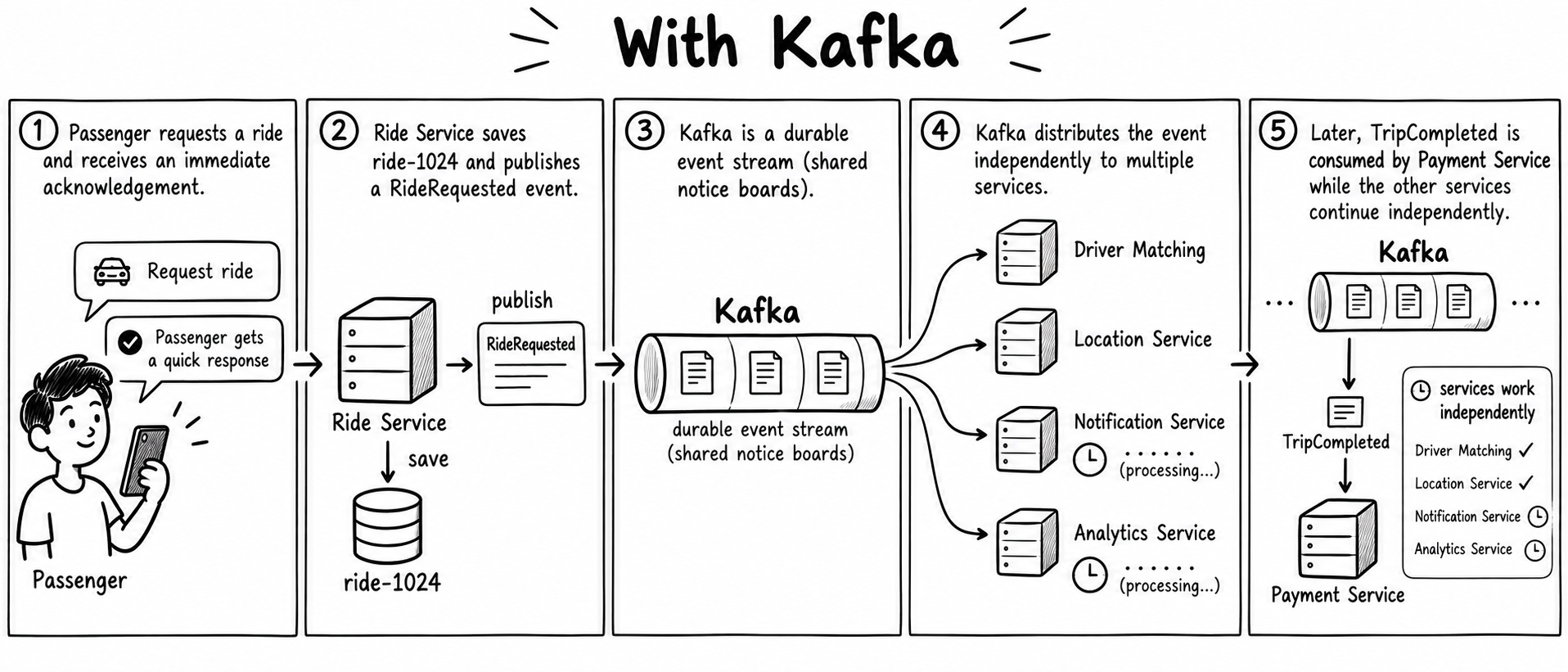
Matching can find a driver, Location can process GPS updates, Notification can send messages, and Analytics can record reports at their own pace. If one service is slow or temporarily unavailable, Kafka keeps the event for that service to process later.
5. Events and topics
The Ride Service publishes events describing facts that have already happened. Kafka stores these events in topics.
An event is a small record appended to a Kafka topic. A topic is an ordered log of these records. Kafka keeps the records for its retention period, so a service can read them later or read them again.
A ride request might look like this:
{
  "event": "RideRequested",
  "rideId": "R101",
  "passengerId": "P22",
  "pickup": "Airport",
  "destination": "City Center"
}
The event is stored once, but several services can read it independently.
6. Adding more details to the story
Our first version used two core events: RideRequested and TripCompleted. A real ride service can add more consumers without changing the Ride Service or the existing consumers.
Location updates
After a driver is assigned, the driver’s phone sends GPS updates to the Location Service. The Location Service publishes a separate DriverLocationUpdated event as the driver moves. Passenger tracking and ETA services can consume these events to update the map and estimate arrival time. This is an additional high-frequency event stream for the live map.
Fraud detection
Fraud Detection checks whether an activity looks suspicious. It might look for many accounts using the same device, an unusual payment pattern, impossible travel between locations, or repeated failed payments. It consumes the events it needs, calculates a risk score, and can flag a ride or payment for review.
7. Consumer
A service that reads events from Kafka is a consumer. Matching consumes RideRequested, Payment consumes TripCompleted, and Notification and Analytics consume the events they need. Each service can process the same event independently.
8. Partitions
A topic can be split into partitions. Each partition is an ordered log, and every message receives an offset. Consumers read the messages in that partition in offset order.
When a producer provides a key, Kafka uses that key to choose a partition. Events with the same key usually go to the same partition, so their order is preserved. In this example, using rideId as the key can keep events for one ride together. Kafka does not promise one global order across different partitions; partitions mainly help spread work across servers and consumers.
9. Consumer groups
A consumer group is a team of application instances sharing work. Each service usually has its own group:
ride-requested
├── matching-service group
├── analytics-service group
Every group can read the same ride request at its own pace. Inside the matching group, several matching-service instances can share partitions. Two consumers in the same group cannot read the same partition at the same time; Kafka assigns each partition to one consumer in that group.
If Analytics stops, Matching can continue. When Analytics returns, it reads from its last committed offset and catches up.
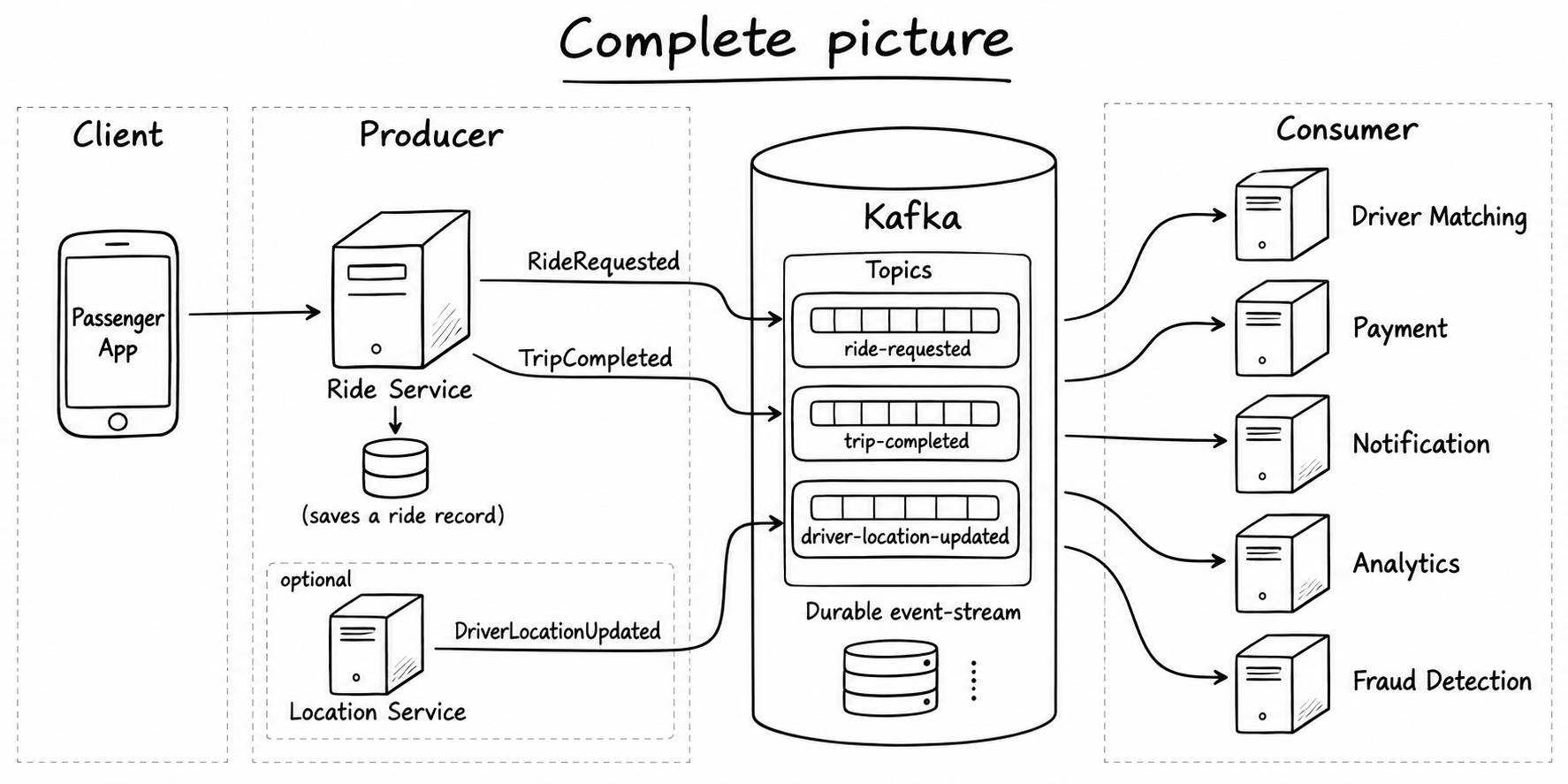
10. Complete picture
The Ride Service is the producer: it saves the ride and publishes events. Kafka stores those events in topics. Consumer services read the topics independently. This gives us one clear path from a request to the services that react to it.
11. One ride, step by step
- The passenger requests a ride.
- Ride Service saves the ride and publishes
RideRequested. - Matching Service consumes the event and assigns a driver.
- It publishes
DriverAssigned. - Location Service publishes
DriverLocationUpdatedevents. - When the trip ends, Ride Service publishes
TripCompleted. - Payment consumes that event and publishes
PaymentCompleted. - Notification consumes payment and trip events and sends the receipt.
Kafka is useful here because services do not need to call every other service directly. They publish facts, and interested services consume those facts.
12. What comes next?
Our ride-sharing design now has producers, events, topics, partitions, consumers, and consumer groups. The next concepts show how Kafka supports the system as it grows.
Broker and Kafka cluster
A broker is one Kafka server. A Kafka cluster is a group of brokers working together. Kafka spreads the partitions of a ride-events topic across the brokers, so the work and storage are shared.
Kafka cluster
├── Broker 1
├── Broker 2
└── Broker 3
Replication
Kafka can keep copies of a partition on multiple brokers. With a replication factor of three, one broker holds the leader replica and two brokers hold follower replicas. The leader handles writes; followers copy the data and can take over if the leader fails.
Partition 0
├── Broker 1: leader
├── Broker 2: follower
└── Broker 3: follower
Retention
Kafka keeps events for a configured retention period. After that period, Kafka can remove them even if a consumer has already read them. In our ride system, trip and payment events may be kept longer for reporting, while high-frequency location events may need a shorter period.
Consumer lag
Consumer lag is the gap between the latest event in a partition and the last event a consumer has processed. If Analytics is slow while Ride Service keeps publishing events, Analytics develops lag and catches up later. Lag helps us see whether a consumer is falling behind.
Rebalancing
When a consumer joins or leaves a consumer group, Kafka reassigns the group’s partitions. For example, if a second Matching Service instance starts, Kafka can divide the matching partitions between the two instances. If one stops, Kafka assigns its partitions to another instance.
Producer acknowledgements
After publishing an event, the producer can wait for an acknowledgement from Kafka. The acknowledgement tells the Ride Service that Kafka accepted the record. Stronger acknowledgement settings wait for more replica confirmation and improve durability, but may add a little latency.
Delivery guarantees
Kafka supports different delivery trade-offs. At-most-once processing may lose an event but avoids redelivery. At-least-once processing retries until the event is acknowledged, so a consumer may see duplicates; this is the model our Payment Service must handle with idempotency. Exactly-once processing uses coordinated Kafka transactions to avoid duplicate results inside Kafka, but external actions such as charging a card still need careful design.
Schemas and event contracts
An event schema is the agreed structure of an event. For RideRequested, the producer and consumers should agree on fields such as eventId, rideId, passengerId, pickup, and destination. A schema makes it safer to add fields or evolve services without silently breaking consumers.
Log compaction
Normal retention keeps records for a period of time. Log compaction is different: for a keyed topic, Kafka can keep the latest record for each key and remove older records. A compacted topic could keep the latest known state for rideId=R101. It is useful for rebuilding current state, while the full event history may still belong in a normal retained topic.
Monitoring
Operators monitor consumer lag to find slow consumers, broker health to find failed servers, partition and replica status to find under-replicated data, and failed-message handling to find events that need retry or review. In our ride system, a growing Payment Service lag or repeated failed TripCompleted events needs attention.
Offsets and replay
Each message in a partition has an offset, which is its position in that partition. A consumer commits its offset after it has successfully processed the message. If Analytics restarts, it can continue from its last committed offset. It can also start from an older offset to rebuild a report by replaying past ride events.
Retries and duplicate events
Suppose Payment Service reads TripCompleted and successfully charges the customer. If Payment Service crashes before committing its offset, Kafka cannot know that the charge succeeded. After Payment Service restarts, Kafka delivers the same event again because its offset is still uncommitted.
1. Payment Service reads TripCompleted
2. Payment Service charges the customer
3. Payment Service crashes before committing the offset
4. Kafka delivers TripCompleted again
5. Payment Service checks whether this event was already handled
Kafka is responsible for storing the event and delivering it again. Kafka does not know whether a business action, such as a card charge, already happened. The consumer must take care of idempotency: processing the same event more than once should not create an unwanted second result.
Payment Service can store an event ID or rideId with the completed payment. When the event arrives again, it checks that record. If the payment already exists, it skips the charge and commits the offset. If it does not exist, it charges the customer and records the result.
Continue learningReturn to Kafka concepts →
Review topics, partitions, brokers, and consumer groups.